
Eursap's SAP Tips: Using default values in SAP Fiori - learn how to set them
Mar 03,2023
|
Written by
Jon Simmonds
Eursap's SAP Tips: Using default values in SAP Fiori
Creating a list of default values in the SAP GUI can be done relatively straightforwardly by using Parameter IDs – see the Eursap previous tip here for information.
However, how can we set default values in Fiori?
No problem.
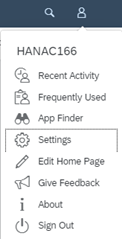
To do this, in your Fiori launchpad, go to the Settings option under your person icon:
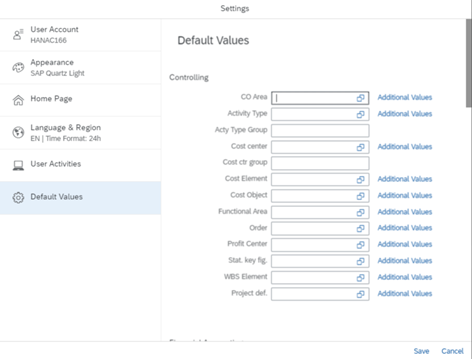
The tab “Default Values” contains a list of all the potential default values you can use for your Fiori apps. This is easier than parameter IDs as you do not need to remember the parameter ID type, and the function is more friendly to personalization.
More blogs

Eursap's SAP Tips: Further reading on SAP - how to upskill yourself for free
Eursap's SAP Tips: Further reading on SAP - how to upskill yourself for free
One of the challenges in today
Feb 28, 2025

Eursap's Ask-the-SAP-Expert: Tanya Wade
Ask-the-SAP-Expert – Tanya Wade
Eursap’s Ask-the-SAP-Expert article is a feature designed to give y
Feb 25, 2025

Eursap's SAP Tips: Keyboard shortcuts in SAP Fiori
SAP Tips: Keyboard shortcuts in SAP Fiori
SAP Fiori is a modern user interface and as such, caters for acce
Jan 31, 2025