
Eursap's SAP Tips: How to debug in SAP when a popup box interrupts your flow
Mar 02,2021
|
Written by
Jon Simmonds
Eursap's SAP Tips: How to debug in SAP when a popup box interrupts your flow?
Debugging is a great tool for analysis of errors, but how do you run debug when you are faced with a popup box?
This is simple – follow the below steps:
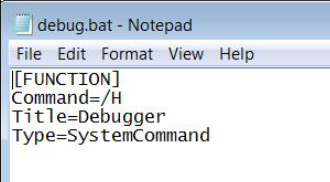
1. Open Notepad and add the following (just copy and paste):
[FUNCTION] Command=/H
Title=Debugger
Type=SystemCommand
2. Save the notepad file as "debug.bat" (the name of the file is optional here – I just use “debug” because it makes sense).
Your notepad file should look like this:
3. When the pop up appears, drag the file from your file directory on to the popup to activate debugging.
4. Done!
I hope you find this useful!
More blogs

Eursap's SAP Tips: Further reading on SAP - how to upskill yourself for free
Eursap's SAP Tips: Further reading on SAP - how to upskill yourself for free
One of the challenges in today
Feb 28, 2025

Eursap's Ask-the-SAP-Expert: Tanya Wade
Ask-the-SAP-Expert – Tanya Wade
Eursap’s Ask-the-SAP-Expert article is a feature designed to give y
Feb 25, 2025

Eursap's SAP Tips: Keyboard shortcuts in SAP Fiori
SAP Tips: Keyboard shortcuts in SAP Fiori
SAP Fiori is a modern user interface and as such, caters for acce
Jan 31, 2025