
Eursap's SAP Tips: Finding the app ID for an SAP Fiori app (Useful for when logging a support call)
Jun 03,2022
|
Written by
Jon Simmonds
Eursap's SAP Tips: Finding the app ID for an SAP Fiori app
When logging a support call with SAP for an issue with a Fiori app, the SAP adviser will always ask you for the technical name of the Fiori app. But how to get it?
Simple – follow these steps:
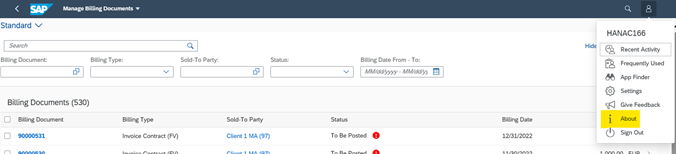
1. Open up SAP Fiori and navigate to the app of your choosing.
2. Click on the “Me” icon and select “About”:
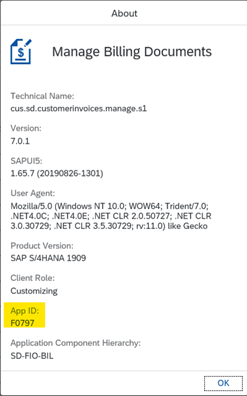
3. The App ID is shown as below:
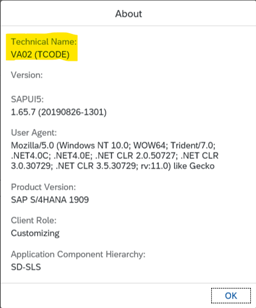
4. For transactional apps, the technical name will be the SAP transaction code, as seen below:
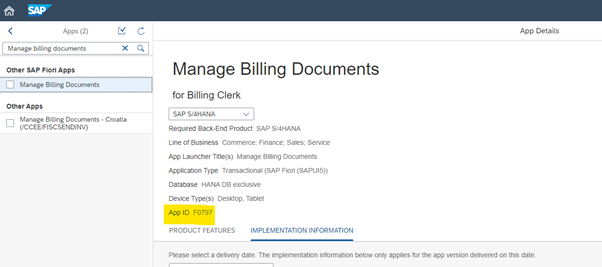
Please note this only works in SAP S/4HANA from 1709 upwards. If you are on earlier versions, you can always get the technical app ID from the Fiori apps library, as seen below, at
https://fioriappslibrary.hana.ondemand.com/sap/fix/externalViewer/#/home.
More blogs

Eursap's SAP Tips: Further reading on SAP - how to upskill yourself for free
Eursap's SAP Tips: Further reading on SAP - how to upskill yourself for free
One of the challenges in today
Feb 28, 2025

Eursap's Ask-the-SAP-Expert: Tanya Wade
Ask-the-SAP-Expert – Tanya Wade
Eursap’s Ask-the-SAP-Expert article is a feature designed to give y
Feb 25, 2025

Eursap's SAP Tips: Keyboard shortcuts in SAP Fiori
SAP Tips: Keyboard shortcuts in SAP Fiori
SAP Fiori is a modern user interface and as such, caters for acce
Jan 31, 2025