
Eursap's SAP Tips: Enabling attachments to be added and displayed in sales orders
Aug 13,2021
|
Written by
Jon Simmonds
Eursap's SAP Tips: Enabling attachments to sales orders
Did you know, that by adding a simple parameter to your SAP username, you can enable attachments to be added and displayed in sales orders, via the “Generic Object Services” (GOS) button?
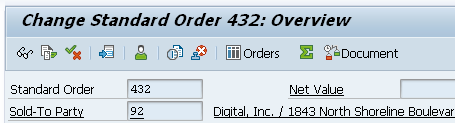
Here is the SAP GUI sales order header without the GOS button enabled:
And in Fiori:

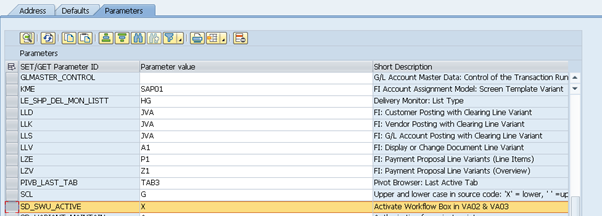
Now go to transaction SU3 and add parameter SD_SWU_ACTIVE with an “X” in the Parameters tab, as below:
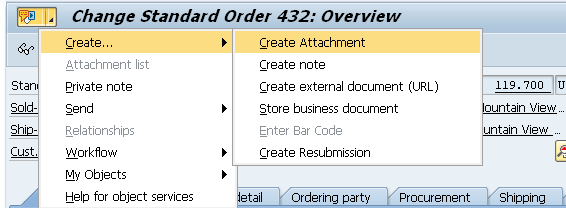
Now see the GOS button in your sales orders:
And Fiori, displays as “Services for Object”:

More blogs

Eursap's SAP Tips: Further reading on SAP - how to upskill yourself for free
Eursap's SAP Tips: Further reading on SAP - how to upskill yourself for free
One of the challenges in today
Feb 28, 2025

Eursap's Ask-the-SAP-Expert: Tanya Wade
Ask-the-SAP-Expert – Tanya Wade
Eursap’s Ask-the-SAP-Expert article is a feature designed to give y
Feb 25, 2025

Eursap's SAP Tips: Keyboard shortcuts in SAP Fiori
SAP Tips: Keyboard shortcuts in SAP Fiori
SAP Fiori is a modern user interface and as such, caters for acce
Jan 31, 2025