
Eursap's SAP Tips: Copying multiple lines of text in the SAP GUI - A quick and easy way!
Aug 05,2022
|
Written by
Jon Simmonds
Eursap's SAP Tips: Copying multiple lines of text in the SAP GUI
One of those quick and easy tips which makes life easier in the SAP GUI is the ability to copy and paste multiple lines.
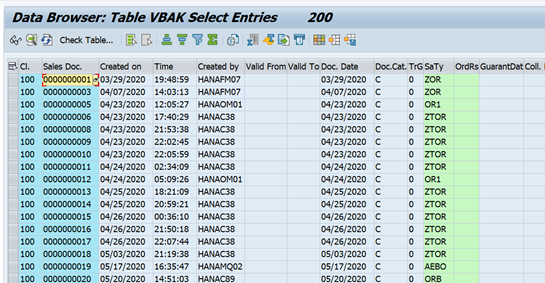
For example, the table entries in SE16 shown below cannot be copied other than one by one.
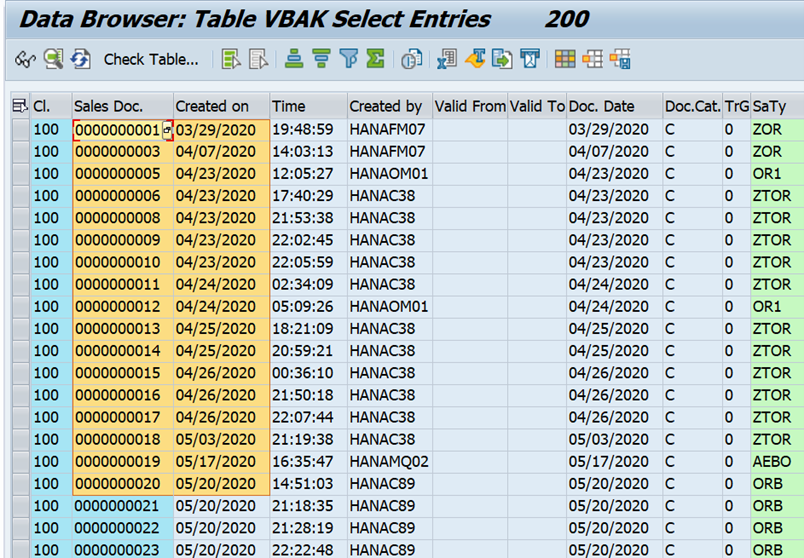
To select more than one entry in rows, columns, use CTRL+Y.
This allows you to highlight multiple lines for copying as below.
You can then paste wherever you like as normal using CTRL+ V.
More blogs

Eursap's SAP Tips: Further reading on SAP - how to upskill yourself for free
Eursap's SAP Tips: Further reading on SAP - how to upskill yourself for free
One of the challenges in today
Feb 28, 2025

Eursap's Ask-the-SAP-Expert: Tanya Wade
Ask-the-SAP-Expert – Tanya Wade
Eursap’s Ask-the-SAP-Expert article is a feature designed to give y
Feb 25, 2025

Eursap's SAP Tips: Keyboard shortcuts in SAP Fiori
SAP Tips: Keyboard shortcuts in SAP Fiori
SAP Fiori is a modern user interface and as such, caters for acce
Jan 31, 2025