
Eursap's SAP Tips: Changing the status of an IDOC without rerunning it
Oct 06,2020
|
Written by
Jon Simmonds
Eursap's SAP Tips: Changing the status of an IDOC without rerunning it
You have a failed IDOC. You contact your appropriate business team, who deal with the IDOC error manually in SAP.
But now you have a failed IDOC on your hands and you can’t fix it and run it because it will duplicate the manual work carried out by the business.
You just need to change the status of the IDOC so it is not picked up in your error reporting anymore.
How is this done? Nice and simple – run program RC1_IDOC_SET_STATUS. This presents you with the following screen:
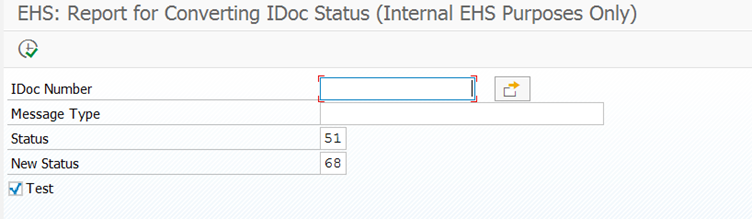
From here you can amend the status (status 68 is a good one to amend it to – it denotes “Error – no further processing” and has a green traffic light associated with it).
More blogs

Eursap's SAP Tips: Further reading on SAP - how to upskill yourself for free
Eursap's SAP Tips: Further reading on SAP - how to upskill yourself for free
One of the challenges in today
Feb 28, 2025

Eursap's Ask-the-SAP-Expert: Tanya Wade
Ask-the-SAP-Expert – Tanya Wade
Eursap’s Ask-the-SAP-Expert article is a feature designed to give y
Feb 25, 2025

Eursap's SAP Tips: Keyboard shortcuts in SAP Fiori
SAP Tips: Keyboard shortcuts in SAP Fiori
SAP Fiori is a modern user interface and as such, caters for acce
Jan 31, 2025