
Eursap's SAP Tips: Change the number of history entries in your SAP GUI
Aug 26,2021
|
Written by
Jon Simmonds
Eursap's SAP Tips: Change the number of history entries in your SAP GUI
Fields in the SAP GUI hold history for retrieval by pressing backspace or spacebar, as below:
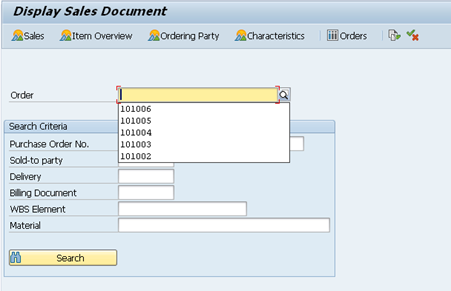
The number of entries in the history can be controlled by the Options in the SAP GUI – press here:

Then amend the Maximum Number of Entries in the History Settings, as below:
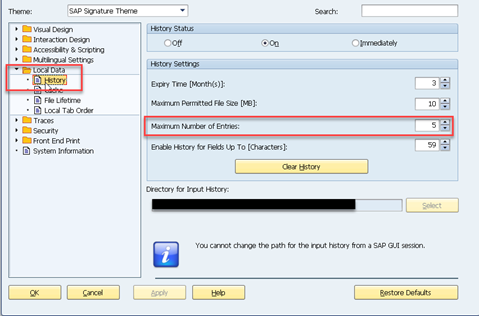
Once you log off and log back on, your settings will be activated.
More blogs

Eursap's SAP Tips: Further reading on SAP - how to upskill yourself for free
Eursap's SAP Tips: Further reading on SAP - how to upskill yourself for free
One of the challenges in today
Feb 28, 2025

Eursap's Ask-the-SAP-Expert: Tanya Wade
Ask-the-SAP-Expert – Tanya Wade
Eursap’s Ask-the-SAP-Expert article is a feature designed to give y
Feb 25, 2025

Eursap's SAP Tips: Keyboard shortcuts in SAP Fiori
SAP Tips: Keyboard shortcuts in SAP Fiori
SAP Fiori is a modern user interface and as such, caters for acce
Jan 31, 2025