
Eursap's SAP Tips: A useful way of searching for business content in IDOCs
Apr 15,2021
|
Written by
Jon Simmonds
Eursap's SAP Tips: How to search for business content in IDOCs
A useful way of searching for specific business content within IDOCs is to use transaction WE09.
Within this transaction, you can specify a whole load of parameters to restrict your search. Additionally, in the “Criteria for Search in Data Records” section of the screen, you can search for a specific value in the “for Value” field.
Example – if you want to see all IDOCs for a specific material number, you could add the material number into the “for Value” field. If you know the IDOC segment and/or the field name, you can add this in to make the search quicker.
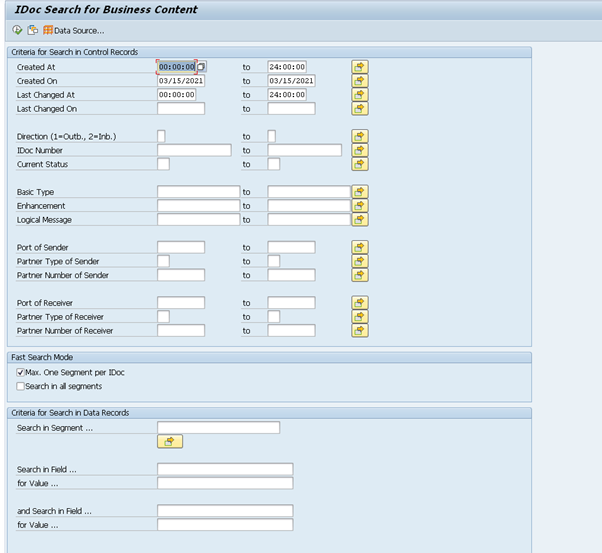
You can also use the IDOC central processing cockpit, in transaction WLF_IDOC to find this too.
I hope you find this useful.
More blogs

Eursap's SAP Tips: Further reading on SAP - how to upskill yourself for free
Eursap's SAP Tips: Further reading on SAP - how to upskill yourself for free
One of the challenges in today
Feb 28, 2025

Eursap's Ask-the-SAP-Expert: Tanya Wade
Ask-the-SAP-Expert – Tanya Wade
Eursap’s Ask-the-SAP-Expert article is a feature designed to give y
Feb 25, 2025

Eursap's SAP Tips: Keyboard shortcuts in SAP Fiori
SAP Tips: Keyboard shortcuts in SAP Fiori
SAP Fiori is a modern user interface and as such, caters for acce
Jan 31, 2025